Building a 16-Bit Computer from Scratch: CPU Architecture, Custom Assembler, Memory and Pixel Graphics
Designing a complete computing system using Logisim Evolution, Java, assembly language, and digital logic.
Introduction
What actually happens inside a computer when we execute a program?
How does a processor interpret machine instructions? How does it perform arithmetic, access memory, handle input, and display graphics?
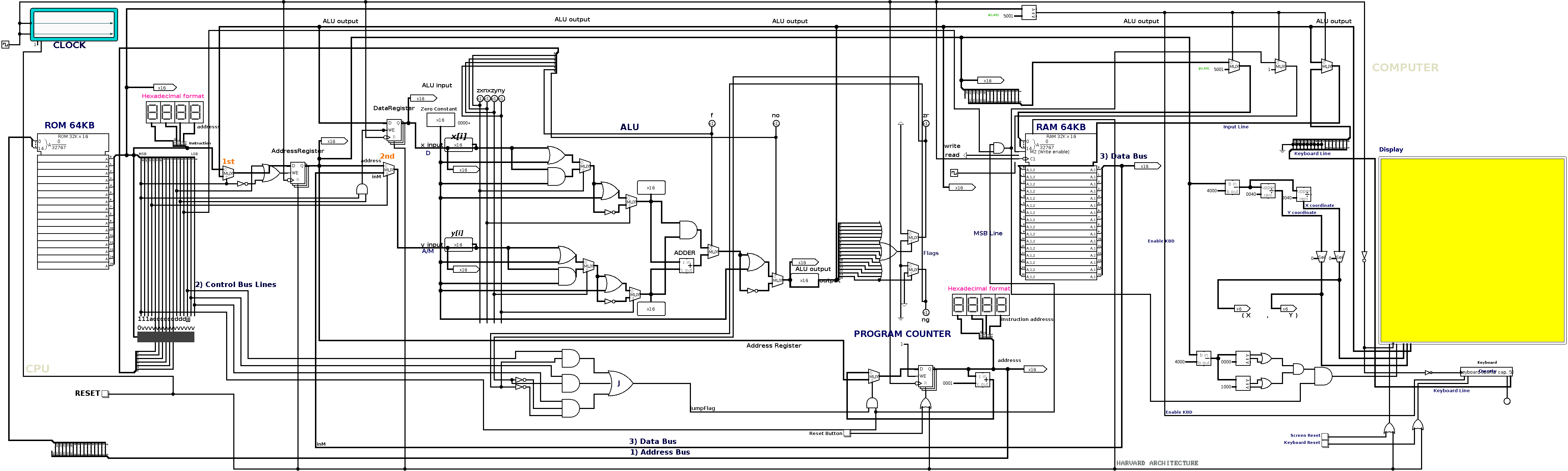
To explore these questions at the hardware level, I developed Modern Day Computing System, a 16-bit computer architecture built using Logisim Evolution.
The project integrates a custom CPU, Arithmetic Logic Unit (ALU), registers, Program Counter, RAM, ROM, instruction decoder, Java-based assembler, keyboard interface, and a memory-mapped graphical display.
The architecture is inspired by the Nand2Tetris approach, with additional experiments in memory organization, RGB graphics, and hardware-software integration.
The objective was to build an interconnected system capable of executing assembly programs and producing observable results through memory and graphical output.
GitHub Repository: https://github.com/MODERN-DAY-COMPUTING-SYSTEM/PROJECT
1. System Architecture
The computer follows a 16-bit Harvard-style architecture, with separate instruction and data memory.
The principal components are:
- CPU: Executes instructions and controls data movement.
- ALU: Performs arithmetic and logical operations.
- Registers: Store operands, addresses, and intermediate results.
- Program Counter: Tracks instruction addresses and handles branching.
- RAM: Stores program data and variables.
- ROM: Stores executable machine instructions.
- Instruction Decoder: Generates control signals from the instruction bits.
- Memory-Mapped Display: Converts memory writes into pixel output.
- Keyboard Interface: Makes external input available to programs.
The execution process begins with an assembly program, which is translated into machine code by the Java assembler and loaded into ROM.
The CPU fetches instructions from ROM, decodes them, performs the required operations, and interacts with memory or I/O devices.
This establishes a complete connection between software instructions and simulated hardware behavior.
2. Designing the 16-Bit CPU
The CPU is the central processing component of the system.
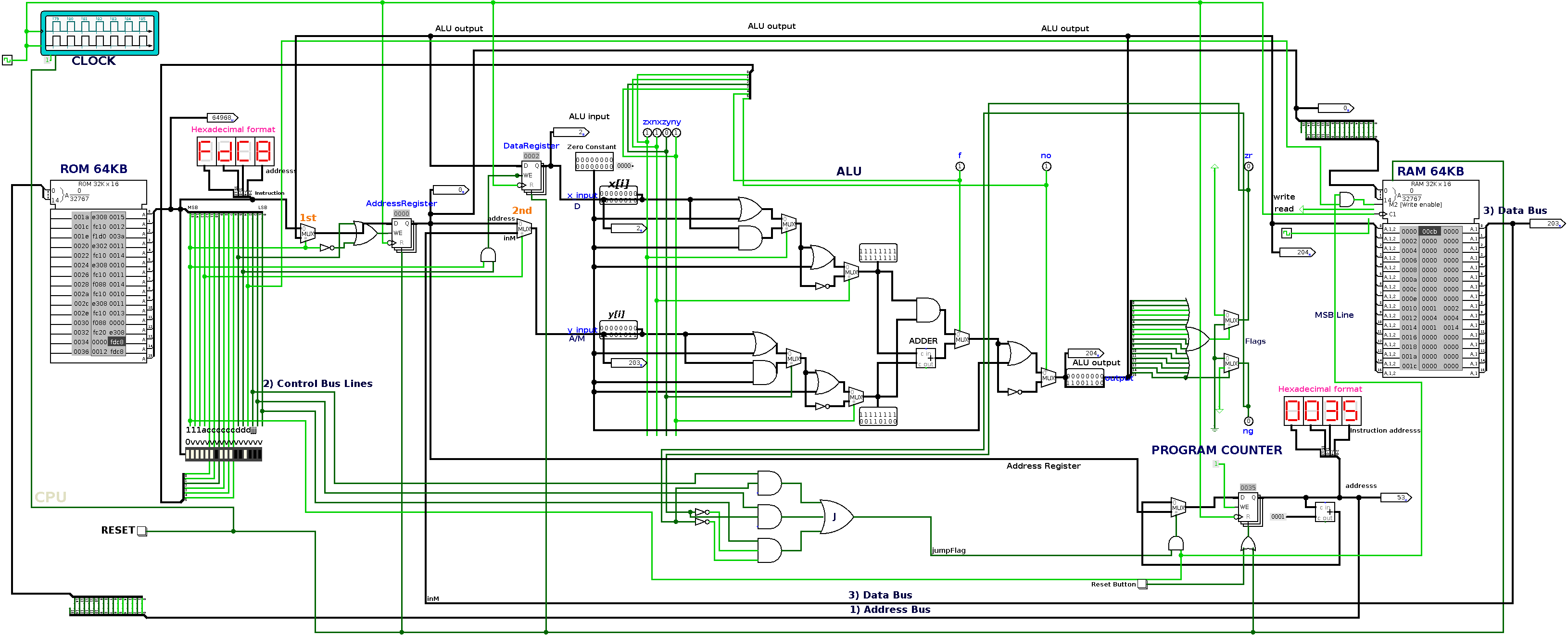
Its design consists of registers, multiplexers, instruction-decoding circuitry, ALU control logic, memory interfaces, and jump-control circuitry.
Registers
The architecture contains three particularly important registers:
A Register (Address Register)
Stores addresses or immediate values. It is used to access memory and provide an operand to the ALU.
D Register (Data Register)
Stores intermediate values and operands used in arithmetic and logical computations.
Program Counter (PC)
Contains the address of the next instruction to execute.
These registers form the foundation for instruction execution and data movement.
Instruction Execution
The CPU implements the essential stages of instruction processing:
- Fetch an instruction from ROM using the Program Counter.
- Decode the instruction to determine the required operation.
- Route operands through the appropriate registers and multiplexers.
- Execute the operation using the ALU.
- Update registers or memory when required.
- Increment the Program Counter or perform a conditional jump.
The key engineering challenge is coordinating these operations using digital control signals rather than software-level abstractions.
3. Arithmetic Logic Unit (ALU)
The ALU operates on 16-bit values and forms the computational core of the processor.
I implemented arithmetic and logical circuitry using components such as adders, multiplexers, and logic gates.
The ALU supports operations including:
- Addition and subtraction
- Incrementing and decrementing
- Bitwise AND, OR, and NOT
- Operand selection and negation
- Computation of zero and negative status flags
Status Flags
Two important outputs are generated from the ALU result.
Zero flag (ZR): Indicates whether the computation produced zero.
Negative flag (NG): Indicates whether the result is negative when interpreted as a signed 16-bit value.
These signals are subsequently used by the CPU's jump logic to evaluate conditional branches.
The ALU is therefore responsible not only for computation but also for providing the information necessary to control program execution.
4. Instruction Set Architecture (ISA)
A CPU requires an instruction set defining how software communicates with its hardware.
The computer implements a 16-bit instruction encoding based on the Hack instruction architecture.
There are two principal instruction formats.
A-Instruction
An A-instruction loads a value into the A register.
Its binary representation consists of a leading 0 followed by a 15-bit value.
For example:
@100
This instruction loads the value 100 into the A register.
C-Instruction
C-instructions perform computations, update destinations, and control branching.
The instruction format is:
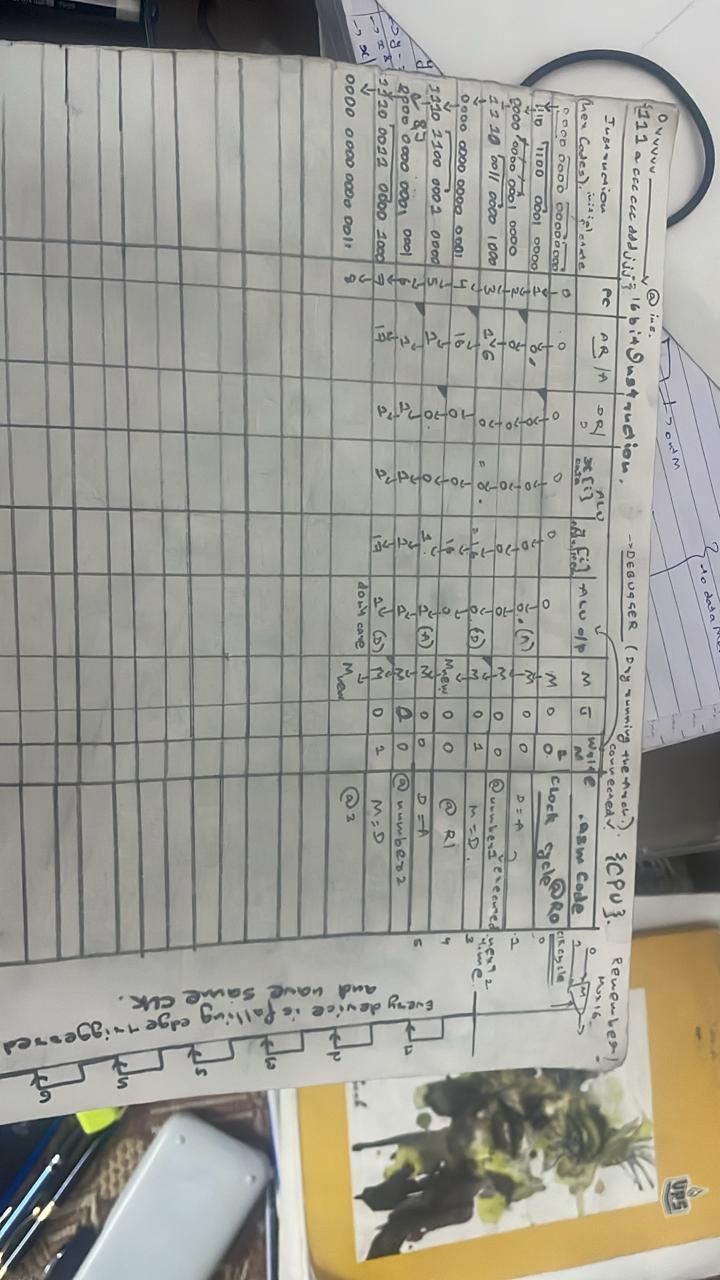
111accccccdddjjj
Each field has a specific purpose:
| Field | Purpose |
|---|---|
111 |
Identifies a computation instruction |
a |
Selects the A register or memory operand |
cccccc |
Specifies the ALU computation |
ddd |
Selects destination registers or memory |
jjj |
Specifies conditional jump behavior |
An example is:
D=D+A
The CPU decodes this instruction, routes the operands into the ALU, performs addition, and stores the result in the D register.
Another example:
D;JGT
This uses the ALU status flags to branch when the computed value is greater than zero.
The instruction decoder translates the binary representation into the control signals required by the underlying digital circuitry.
5. Program Counter and Jump Logic
The Program Counter determines which instruction the CPU executes next.
During normal sequential execution, the PC increments to point to the next ROM address.
However, instructions such as loops and conditional branches require the CPU to change the execution sequence.
The jump-control circuitry evaluates the encoded jump condition using the ALU's zero and negative flags.
Depending on the instruction and control signals, the PC can:
- Increment sequentially.
- Load a target address for branching.
- Reset to the initial instruction address.
This makes it possible to implement loops, conditional execution, and other essential control-flow operations directly in assembly language.
6. 64 KB RAM and 64KB ROM Architecture
Memory design was another major component of the project.
Hierarchical RAM Design
Rather than treating RAM simply as a prebuilt storage device, I explored its construction through hierarchical digital circuits.
Smaller memory modules were combined into larger structures using address decoding, registers, and multiplexers.
The memory subsystem supports storing 16-bit data, accessing values through addresses, and performing controlled read/write operations.
ROM and Instruction Storage
ROM is responsible for storing the executable machine instructions generated by the assembler.
The Program Counter supplies an address to ROM, and the corresponding instruction is delivered to the CPU.
Separating instruction memory from data memory simplifies the instruction-fetching process and allows the CPU to fetch instructions while maintaining a distinct data-memory interface.
Memory-Mapped I/O
An important feature of the architecture is memory-mapped input/output.
Instead of requiring a completely separate instruction set for peripheral access, designated memory addresses represent hardware devices.
This concept is used for the graphical display and keyboard interface.
It enables ordinary memory-access instructions to interact with peripherals.
7. Building a Custom Assembler in Java
With the CPU and ISA defined, the next requirement was a way to convert human-readable assembly programs into machine instructions.
I developed a custom assembler using Java.
Its purpose is to translate assembly language into the binary representation understood by the simulated processor.
Assembler Implementation
The assembler handles:
- Reading assembly instructions from source files.
- Processing instruction syntax and comments.
- Resolving labels and symbolic addresses.
- Translating address instructions into binary.
- Encoding computations, destinations, and jump conditions.
- Generating 16-bit machine instructions.
I also implemented a hexadecimal conversion utility to prepare the generated instructions for loading into Logisim ROM.
Complete Workflow
The process can be represented as:
Assembly Source → Java Assembler → Binary Machine Code → Hexadecimal ROM File → CPU Execution
The repository includes assembly programs for testing arithmetic operations, Fibonacci sequences, pointer and array manipulation, branching, keyboard interaction, and graphics.
Developing the assembler established the connection between the software instruction format and the physical control signals implemented within the CPU.
8. Designing a Memory-Mapped Graphics Display
One of the most interesting additions to the computer was the graphical output subsystem.
I implemented a 64 × 64 pixel framebuffer with RGB565 color representation.
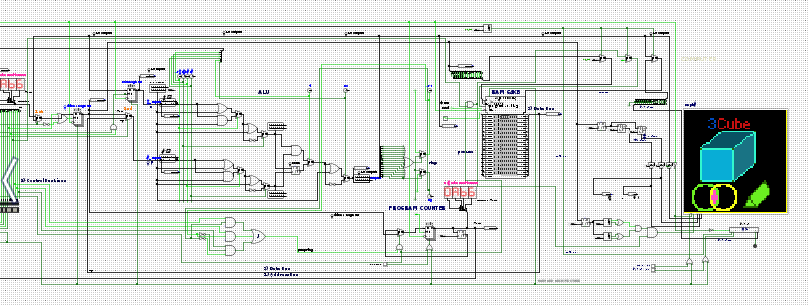
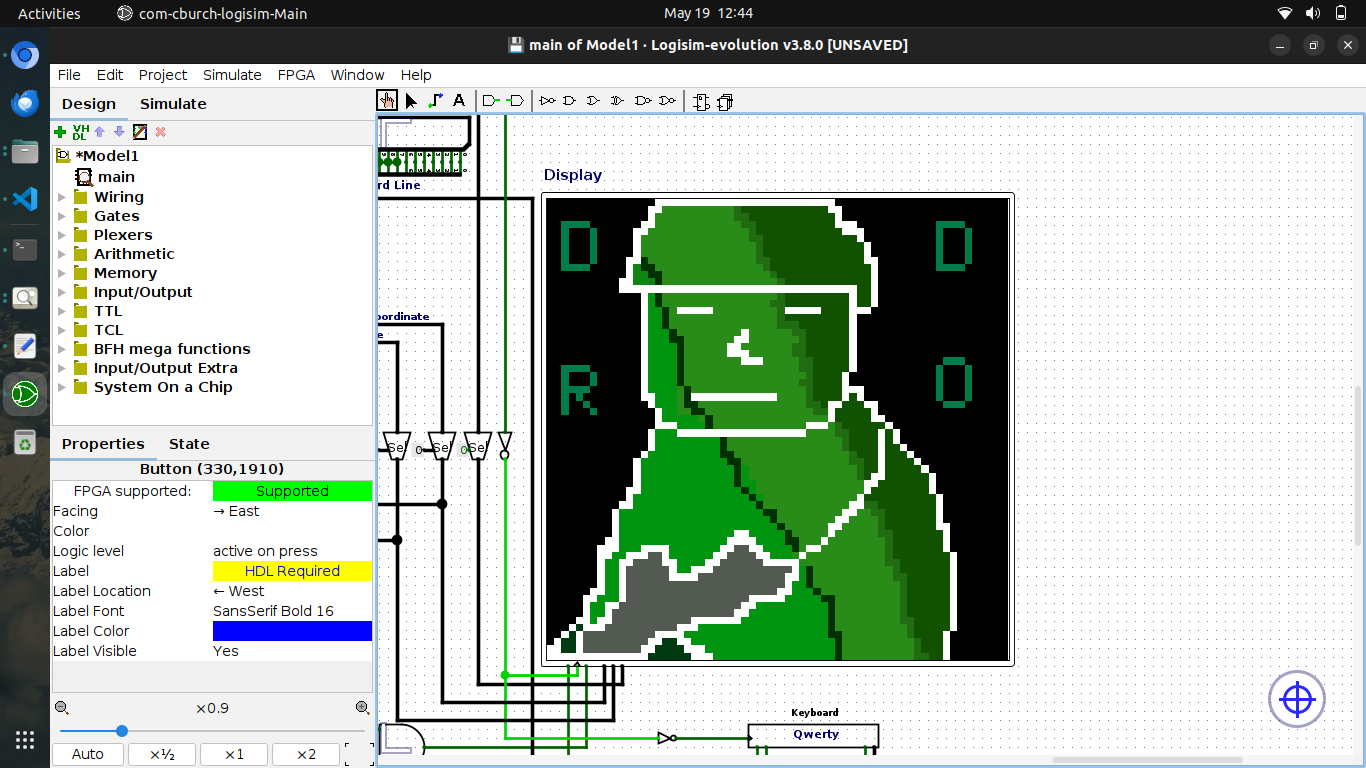
The display contains:
- 64 horizontal pixels
- 64 vertical pixels
- 4,096 individually addressable pixels
- 16-bit storage per pixel
- RGB565 color encoding
In RGB565, giving 32 intensity levels per channel and 65,53 possible colors.
Framebuffer Addressing
The framebuffer starts at memory address:
16384
Each pixel corresponds to one memory location.
The address of a pixel can be calculated using:
Pixel Address = 16384 + (Y × 64) + X
Here, X represents the horizontal position and Y represents the vertical position.
For example, the pixel at coordinate (10, 5) corresponds to:
16384 + (5 × 64) + 10 = 16714
This allows a two-dimensional graphical display to be represented within a linear memory address space.
Rendering Pixels Using Assembly
Pixels can be manipulated using ordinary assembly instructions.
For example, the following program writes a red RGB555 value to the first framebuffer location:
@31744
D=A

@16384
M=D

(END)
@END
0;JMP
The value 31744 corresponds to 0x7C00, representing red in the chosen RGB555 encoding.
The CPU executes the instructions and writes the color value to the appropriate memory location.
The graphical subsystem interprets that memory location as a pixel.
This demonstrates a fundamental concept in computer graphics: display output can be produced directly through memory operations.
9. AI Developed a Web-Based Pixel Graphics Editor
Writing assembly instructions manually for thousands of pixels becomes increasingly impractical.
To make graphics generation easier, I used AI to develop a browser-based bitmap editor using HTML, CSS, and JavaScript.
The editor provides a 64 × 64 canvas corresponding to the simulated computer's display.
Its features include:
- Pixel-level drawing and erasing
- Adjustable brush sizes
- Flood-fill functionality
- Geometric shapes, including rectangles, circles, triangles, and lines
- Character rendering using bitmap fonts
- RGB555 color selection
- Memory-address visualization
- Automatic assembly-code generation
Converting Pixel Graphics into Assembly
The editor maps each pixel to its corresponding framebuffer address.
It then generates assembly instructions that load color values and write them to the appropriate memory locations.
Pixels sharing the same color are grouped during code generation, reducing redundant color-loading instructions.
The generated program can be passed through the Java assembler and prepared for execution on the simulated computer.
This creates an end-to-end workflow:
Draw Pixel Art → Generate Assembly → Assemble Machine Code → Load ROM → Render Graphics
It is particularly interesting because the graphical content is not displayed through a conventional graphics API on the simulated machine.
Instead, the artwork is translated into instructions executed by the custom CPU, which writes directly into framebuffer memory.
Try the Pixel Graphics Editor:
https://modern-day-computing-system.github.io/PROJECT/
10. Keyboard Interface and Memory-Mapped Input
In addition to graphical output, the architecture explores keyboard input through memory mapping.
The idea is to expose keyboard input through an address that can be accessed by the processor.
An assembly program can read from the designated keyboard location and use the retrieved value in subsequent computations or branching operations.
This provides the basis for interactive software, where external input affects the behavior of the running program.
The keyboard subsystem also creates additional design considerations involving address decoding, input synchronization, and coordination with the CPU's memory operations.
11. System Integration and Debugging
Building the individual components was only one part of the project.
Integrating them into a complete computing system introduced a different set of challenges.
Timing and Synchronization
The CPU, registers, memory, and peripherals must operate with compatible timing.
Memory-read latency, clock transitions, and register updates can affect how instructions behave.
Debugging these interactions required examining the movement of signals through the circuit and understanding the sequence of hardware events.
Instruction Decoding
Incorrect computation bits, destination signals, or jump conditions can cause programs to behave unexpectedly.
Testing small assembly programs helped isolate problems in instruction execution and control logic.
Framebuffer Addressing
Generating graphical output required consistent interpretation of memory addresses by both the software and the display circuitry.
Pixel coordinates, framebuffer offsets, and encoded color values all needed to agree.
Simulation Performance
Simulating a large digital system introduces performance constraints, especially when the memory and graphics subsystems involve many interconnected components.
These experiments highlighted the importance of efficient circuit organization and synchronization.
12. Testing the Computer with Assembly Programs
To validate the architecture, I developed and experimented with a collection of assembly programs.
These included:
Arithmetic and Fibonacci programs: Testing ALU operations, data movement, registers, and repeated computation.
Conditional branching programs: Testing Program Counter updates and jump logic.
Pointer and array programs: Testing memory addressing and indirect data access.
Bitmap and RGB programs: Testing framebuffer addressing and graphical output.
Keyboard programs: Exploring input handling and memory-mapped peripheral interaction.
Rather than testing only individual digital components, these programs exercise the interaction between the ISA, CPU, memory system, and peripherals.
They provide a practical way to verify the behavior of the architecture as an integrated computing system.
13. Technologies Used
| Technology | Application |
|---|---|
| Logisim Evolution | Digital circuit design and computer simulation |
| Java | Custom assembler and machine-code generation |
| Assembly Language | Low-level software and architecture testing |
| HTML, CSS, JavaScript | Pixel graphics editor and code generation |
| Digital Logic | ALU, registers, memory, and control circuitry |
| Git and GitHub | Version control and project documentation |
14. Future Development
The existing architecture provides a foundation for further systems-level experimentation.
Potential extensions include:
- Improving simulation performance and memory synchronization.
- Extending the instruction set.
- Developing stronger debugging and instruction-tracing capabilities.
- Adding keyboard buffering and more interactive applications.
- Exploring VGA-style display output and graphics acceleration.
- Experimenting with a minimal operating system.
- Developing higher-level language tools that target the custom ISA.
These extensions would allow the project to evolve from a digital computer simulation toward a more complete experimental computing platform.
Conclusion
Modern Day Computing System brings together the major building blocks of computer architecture within a single simulated environment.
From the ALU and registers to instruction decoding, memory addressing, machine-code generation, and graphical output, each component contributes to the execution of a program.
One of the most meaningful outcomes of the project was successfully connecting multiple layers of computing:
Digital Logic → CPU Architecture → Instruction Set → Assembler → Machine Code → Memory-Mapped Graphics
The project demonstrates how software instructions are ultimately represented as binary control signals, how a CPU performs computations using digital circuits, and how memory operations can produce visible graphical output.
The complete implementation, circuit files, assembler, assembly programs, and bitmap editor are available in the public repository.
GitHub: https://github.com/MODERN-DAY-COMPUTING-SYSTEM/PROJECT
Interactive Pixel Graphics Editor: https://modern-day-computing-system.github.io/PROJECT/
Tags: Computer Architecture, Digital Logic, CPU Design, Assembly Language, Systems Programming
Comments
Join the discussionNo comments yet. Be the first to comment.